Metrics
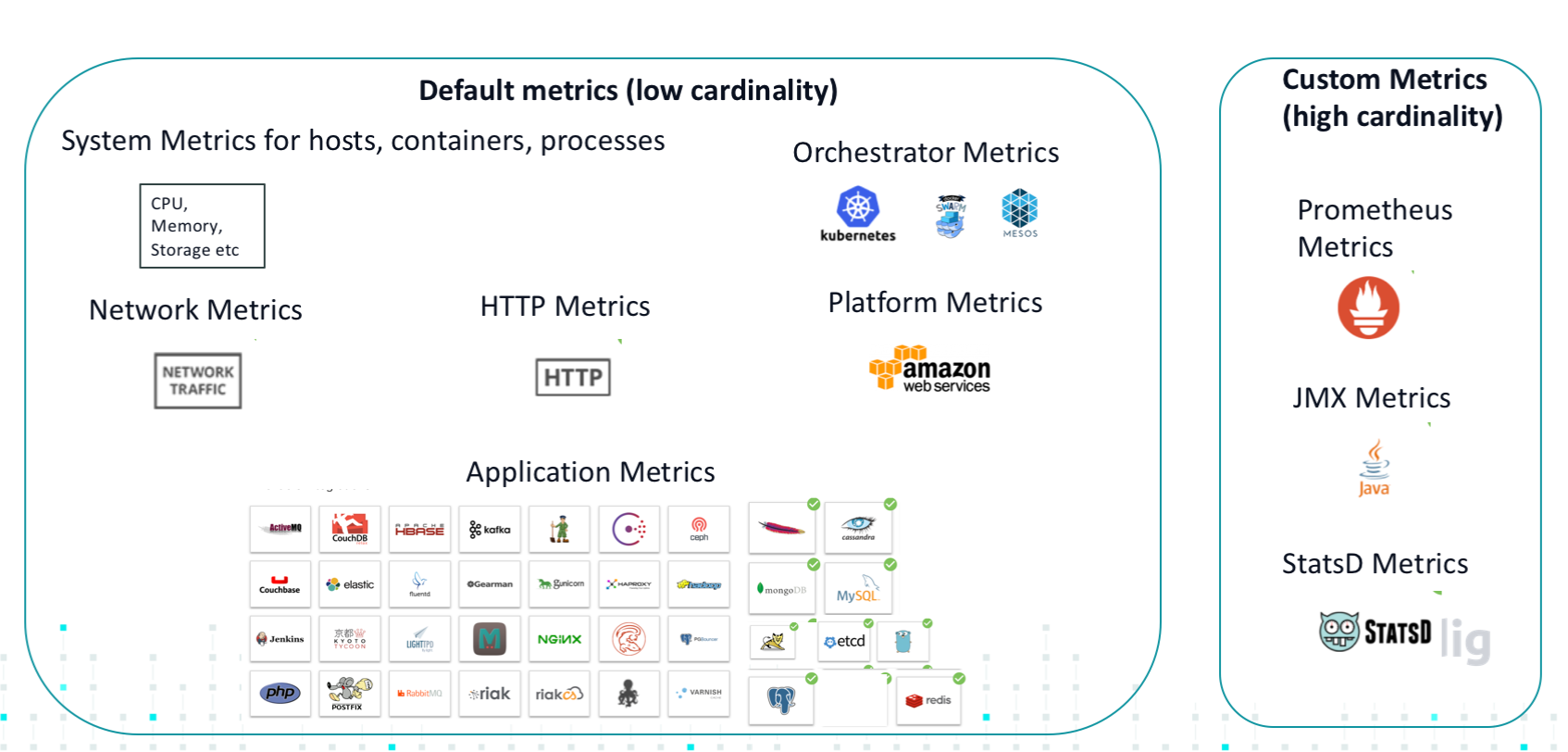
Metrics are quantitative values or measures that can be grouped/divided by labels. Sysdig Monitor metrics are divided into two groups: default metrics (out-of-the-box metrics concerning system, orchestrator, and network infrastructure), and custom metrics(JMX, StatsD, and multiple other integrated application metrics).
 |
Sysdig automatically collects all types of metrics, and auto-labels them. Custom metrics can also have custom (user-defined) labels.
Out-of-the box, when an agent has been deployed on a host, Sysdig Monitor automatically begins collecting and reporting on a wide array of metrics. The sections below describe how those metrics are conceptualized within the system.
Contents
Understanding Default, Custom, and Missing Metrics
Default Metrics
Default metrics include various kinds of metadata which Sysdig Monitor automatically knows how to label, segment, and display.
For example:
System metrics for hosts, containers, and processes (CPU used, etc.)
Orchestrator metrics (collected from Kubernetes, Mesos, etc.)
Network metrics (e.g. network traffic)
HTTP
Platform metrics (in some cases)
Custom Metrics
Custom metrics depend on the type of infrastructure, applications integrated, etc.
For example:
Prometheus
JMX
StatsD
Each metric comes with a set of custom labels, and additional labels can be user-created.
Missing Metrics and the Custom Metrics Lifecycle
Because custom metrics and their labels can grow to millions of entries, they are indexed by the system, and a "metrics lifecycle" is imposed on them and their labels. This improves performance and prevents cluttering the system with short-lived container or metric names.
Sysdig Monitor maintains an index of all custom metrics and custom labels that have reported data in the last 14 days. Each indexed metric/label is available when configuring new or existing artifacts (i.e. dashboards, scopes, alerts etc).
When the system does not receive any data for a metric/label for more than 14 days, or a metric/label is found that has never reported data (for example, it was never added to the metric index), it is removed from the index if present, and marked as missing.
Note
Missing metrics are different to instances where a panel/dashboard states that "Metric data is not available". A missing metric/label is still available for data queries and charts. Existing artifacts are not affected.
However, it is not possible to configure new artifacts with a missing metric/label, or to update existing artifacts unless the missing metrics/labels are removed from the configuration. If new data is received for a missing metric/label, we put it back into the index and the above limitations are removed.
What You See in the UI:
If you configured a dashboard three months ago and a metric in it is now missing, when you go to the dashboard and update it in the dashboard settings, a warning appears below the metric stating that the metric is missing.
To be able to update the dashboard, you must remove all missing metrics from it.
This model applies to custom metrics and custom labels, as they appear in:
Dashboards
Alerts
Team scopes
Explore table
Heuristic and Deprecated Metrics
Heuristic Metrics
Various network related metrics reported by Sysdig, including response times, are calculated at the kernel level by measuring latency between systems calls. In an effort to ensure Sysdig remains the trusted source of infrastructure insights, moving forward we will be labeling some network related metrics as heuristic and are tagging with the symbol  in the application.
Note
Existing alerts using these metrics will not be modified or disabled. However, these alerts will not be able to be updated.
Additional heuristic metric details are listed below:
Metric | Set New Alerts |
|---|---|
net.http.request.time | Yes |
net.http.request.count | Yes |
net.http.error.count | Yes |
net.sql.request.time | Yes |
net.sql.request.count | Yes |
net.sql.error.count | Yes |
net.mongodb.request.time | Yes |
net.mongodb.request.count | Yes |
net.mongodb.error.count | Yes |
net.request.time.file.percent | Yes |
net.request.time.local.percent | Yes |
net.request.time.net.percent | Yes |
net.request.time.nextTiers.percent | Yes |
net.request.time.processing.percent | Yes |
net.request.time | No |
net.request.time.in | No |
net.request.time.out | No |
net.request.time.worst.in | No |
net.request.time.worst.out | No |
net.request.count | No |
net.request.count.in | No |
Deprecated Metrics:
Based on low usage patterns, Sysdig has decided to deprecate the following metrics on August 1, 2018. Users will continue to have the ability to collect similar data using Prometheus, or another method of code instrumentation (i.e. StatsD or JMX for Java applications).
The table below shows the current metrics and options for similar functionality.
Current Metric | Alternative Starting August 1, 2018 |
|---|---|
capacity.estimated.request.stolen.count | Create your application metrics using Prometheus, StatsD or JMXfor Java applications |
capacity.estimated.request.total.count | |
capacity.stolen.percent | |
capacity.total.percent | |
capacity.used.percent | |
net.request.time.file | |
net.request.time.local | |
net.request.time.net | |
net.request.time.nextTiers | |
net.request.time.processing | |
net.sql.request.time.worst | Max aggregation (net.sql.request.time) |
net.mongodb.request.time.worst | Max aggregation (net.mongodb.request.time) |
net.http.request.time.worst | Max aggregation (net.http.request.time) |
Note
Reach out to the Sysdig customer success team for best practices by clicking the in-app chat icon, or email the support team at support@sysdig.com (or submit a ticket).